Before you start
What your Adyen account needs before you connect it to Swell.
You need an Adyen account with a merchant account for online payments. Check the settings below in the Adyen Customer Area before you continue.
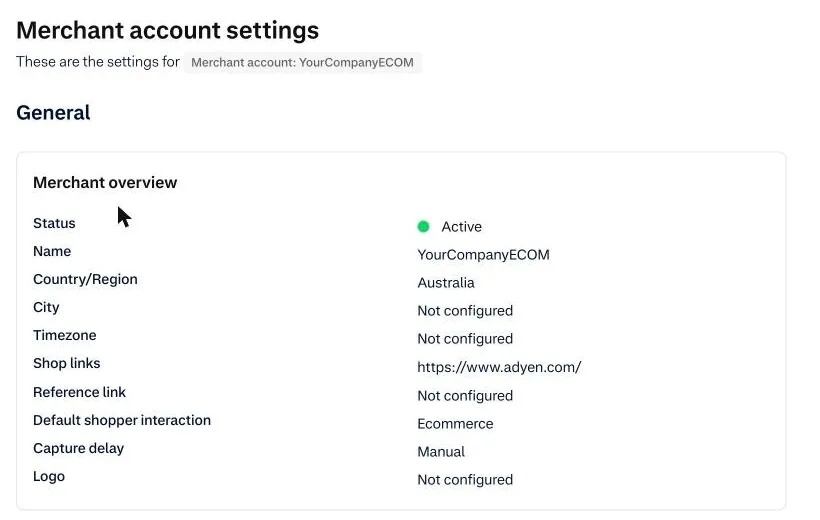
Set capture delay to Manual
The app authorizes the card when the shopper pays, and captures the payment when Swell places the order. For that to work, Adyen must not capture on its own. Subscription renewals are captured straight away, since there’s no order to wait for.
- In the Adyen Customer Area, go to Settings → Company & merchant accounts → Account settings. Make sure your merchant account is selected at the top left.
- Under Merchant overview, edit Capture delay and set it to Manual.
For subscriptions only
Skip this section if you don’t sell subscriptions.
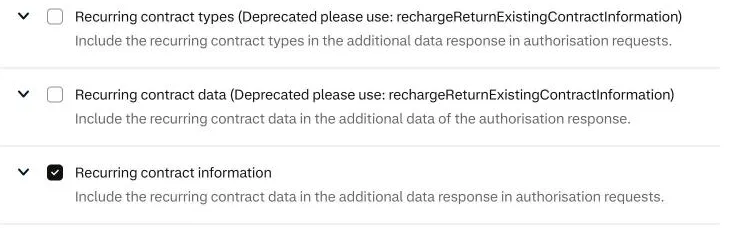
Turn on recurring contract information
In the Adyen Customer Area, go to Developers → Additional data, tick Recurring contract information and save. Adyen then returns the saved card with the first payment, and the app stores it for renewals.
Ask Adyen to enable recurring card payments
The app sends renewals the way Adyen documents for subscriptions, so this isn’t something you can change in Swell or in the app settings. Only Adyen can turn it on. Ask them before your first renewal is due. It can take a few days.
Contact Adyen support (or your Adyen account manager) and send something like:
Please enable merchant-initiated (recurring) card payments on our merchant
account <YourCompanyECOM>, for both test and live.

We charge saved cards for subscription renewals with the Checkout API
(/payments with storedPaymentMethodId, shopperInteraction "ContAuth" and
recurringProcessingModel "Subscription"). These requests are currently
declined with 14_029 "Required field 'cvc' is not provided".
Replace <YourCompanyECOM> with your merchant account. If a renewal has already been declined, add its PSP reference: the 16-character id shown on the payment under Transactions → Payments in Adyen.
What you’ll need from Adyen
Keep the Customer Area open. During setup you’ll copy:
| Item | Where to find it in Adyen |
|---|---|
| API key | Developers → API credentials → your credential → Server settings |
| Client key | Developers → API credentials → your credential → Client settings |
| Merchant account | Shown at the top left of the Customer Area, for example YourCompanyECOM |
| HMAC key | Generated when you create the webhook |
| Live URL prefix (live only) | Developers → API URLs in the live Customer Area |