Allow the payment form's origin
Let Adyen accept the card form that the app loads on your checkout.
The card form loads from the app’s own address. Adyen only accepts card forms from addresses you’ve allowed, so you need to add that address (the origin) to your API credential.
Find your origin
Your origin has this form:
https://<store-id>--<install-id>--app.swell.storeFor example: https://mystore--6a6a51e0f713b600120cb472--app.swell.store.
The easiest way to get the exact value:
- Make sure Environment is set to Test and the settings are saved.
- Open your storefront’s checkout and select Adyen as the payment method.
- If the origin isn’t allowed yet, the card form shows an Invalid origin message with the exact origin to add. Copy it.
Add it in Adyen
- In the Adyen Customer Area, go to Developers → API credentials and open your credential.
- Scroll to Client settings → Add allowed origins.
- Paste the origin into the field and select Add. It appears in the list below.
- Select Save changes at the bottom of the page.
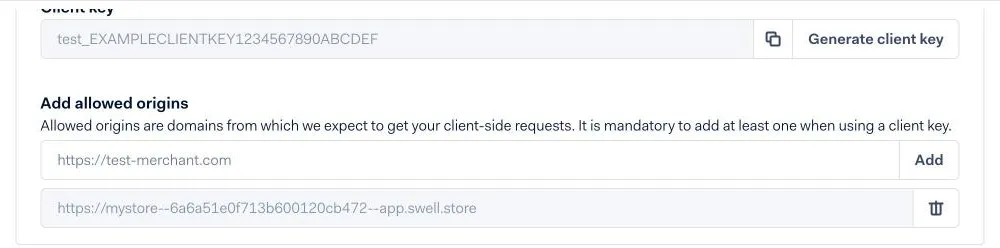
Reload the checkout. The card fields now appear.