Set up the webhook
Let Adyen send payment notifications to your store, as a backup and to report failed captures and refunds.
Adyen sends a notification (a webhook) to your store when a payment changes. Payments, captures, refunds and saved cards don’t depend on it: the app gets Adyen’s answer straight away at checkout and when the order is placed. The webhook is a backup and an alert:
- If the shopper’s browser loses Adyen’s answer at checkout, the webhook still records the payment and the saved card on the cart.
- Adyen finishes captures and refunds a little later. If one fails, the webhook reports it in the app’s function logs, so you can retry it in the Adyen Customer Area.
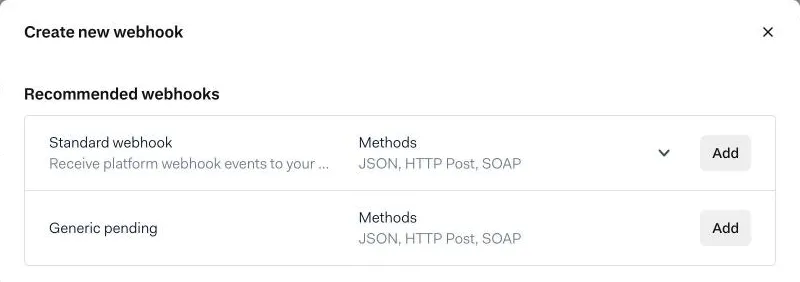
1. Create a Standard webhook
In the Adyen Customer Area, go to Developers → Webhooks and select Create new webhook. Next to Standard webhook, select Add.
2. Enter the server configuration
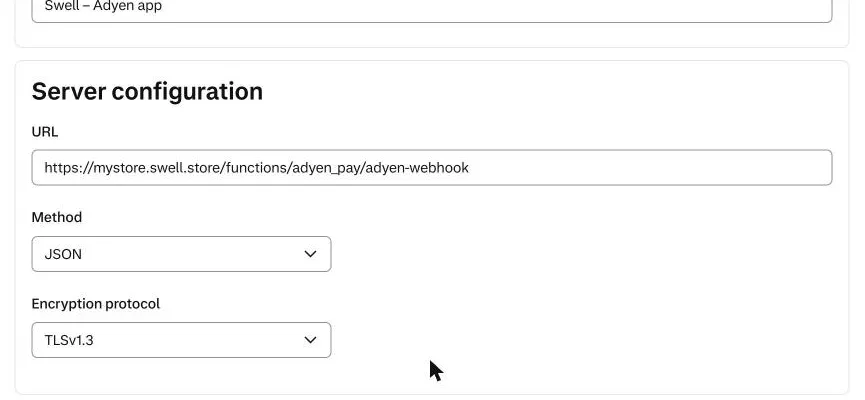
Fill in:
| Field | Value |
|---|---|
| Description | Anything that helps you recognise it, for example Swell – Adyen app |
| URL | https://<store-id>.swell.store/functions/adyen_pay/adyen-webhook |
| Method | JSON |
| Encryption protocol | Keep the default (TLSv1.3) |
<store-id> is your Swell store id: the first part of your <store-id>.swell.store address.
3. Generate the HMAC key
Under Security → HMAC, keep Generate a new key selected and select Generate. Copy the key that appears.
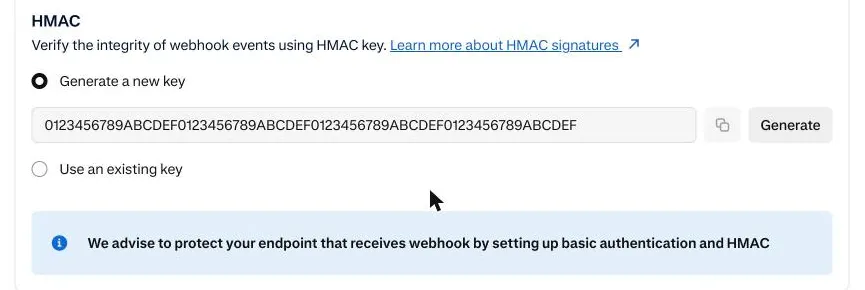
Keep the default Events, then select Save configuration.
4. Paste the HMAC key into Swell
Back in Swell, open Settings → Payments → Adyen → Settings, paste the key into Webhook HMAC key, and select Save.